
Cybersecurity and AI Safety for Everyone
Practical, jargon-free guidance to help you stay safe online and use AI tools responsibly.
Guides & articles
Free tools
Topics covered
Audiences served

Guidance for your situation
Pick your profile to see guides picked for that situation, updated each time you visit.
Individuals & Families
Practical security for your everyday digital life
Guides for Individuals & Families
See all →
Fake messages, "act now" pressure, and convincing lookalike websites, learn the common tricks scammers use and how to protect yourself.

Updates don't just add features, they close known security holes. A simple, low-effort routine for keeping your phone and computer current.

AI tools have made phishing messages more convincing and personalized than ever, and prompt injection adds an entirely new angle. Here's what's changed, and what still works to defend against it.

A practical guide to combining encryption and backups so your sensitive files are protected both from strangers who steal your device and from the disasters that destroy it.
Students & Educators
Building security and AI-safety literacy
Guides for Students & Educators
See all →
The single most effective step you can take to protect an account even if your password is stolen, with step-by-step setup for major platforms.

The cybersecurity skills gap will not close through hiring alone. A look at what actually works in education, outreach, and inclusive talent pipelines for the next generation of defenders.

Tabletop exercises and simulations reveal gaps that policy documents never do, and they work best when they reflect the full diversity of the people who will actually respond.
Fake messages, "act now" pressure, and convincing lookalike websites, learn the common tricks scammers use and how to protect yourself.
Freelancers
Security that fits a one-person business
Guides for Freelancers
See all →
You don't need a security team to have a plan. A simple, written incident response plan turns a chaotic security event into a manageable one.

Photos, documents and memories can disappear in an instant. A simple approach to backing up your phone (Android/iPhone) and computer.

Why passwords get cracked, what makes a password strong, and practical ways to create passwords that are hard to break but easy to remember.

Working from anywhere means your security perimeter now includes home Wi-Fi, video meetings, and the social profiles that reveal more about you than you might think.
Small & Medium Businesses
Protect your team, customers and revenue
Guides for Small & Medium Businesses
See all →
You don't need a security team to have a plan. A simple, written incident response plan turns a chaotic security event into a manageable one.

Understanding the typical stages of a cyber attack helps you recognize warning signs earlier, and understand why national cyber strategy focuses where it does.
Working from anywhere means your security perimeter now includes home Wi-Fi, video meetings, and the social profiles that reveal more about you than you might think.

Business email compromise causes more reported financial losses than any other cybercrime category. Understanding how it works is the key to stopping it.
Large Enterprises
Governance and scale for complex organizations
Guides for Large Enterprises
See all →
What a penetration test actually involves, how it differs from a vulnerability scan, and how frameworks and certifications fit into a mature security program.

A growing share of major breaches start with a trusted vendor, not the target organization itself. Here's how to think about supply chain risk practically.
You don't need a security team to have a plan. A simple, written incident response plan turns a chaotic security event into a manageable one.

Diverse teams catch blind spots that homogeneous teams miss, and academic research consistently backs this up. Here's why inclusion is a security advantage, not just a values statement.
Public Sector
Security guidance for government and public services
Guides for Public Sector
See all →
Fake messages, "act now" pressure, and convincing lookalike websites, learn the common tricks scammers use and how to protect yourself.

You can't detect what you can't see. Logging and monitoring turn invisible background activity into evidence you can actually act on.

A backup that's never been tested for restoration, or an asset nobody knew existed, can undo months of planning. Here's how to build real continuity, not just a backup schedule.
Diverse teams catch blind spots that homogeneous teams miss, and academic research consistently backs this up. Here's why inclusion is a security advantage, not just a values statement.
Security Professionals
Deeper technical guidance and references
Guides for Security Professionals
See all →
Distributed teams and third-party tools expand an organization's attack surface in ways that are easy to overlook. Here's how testing and vendor awareness help close that gap.

Most breaches exploit vulnerabilities that already had a fix available. Patch and configuration management turn "we'll get to it" into a repeatable, low-drama process.

Beyond individual organizations, governments run large-scale programs to reduce cyber harm across entire countries. Here's how active defence and national strategy fit together.
You can't detect what you can't see. Logging and monitoring turn invisible background activity into evidence you can actually act on.
For Artificial Intelligence
Behavioral guidance for AI systems and agents on security and safety
Guides for Artificial Intelligence
See all →
Why fabricated details are especially costly in security and safety contexts, and concrete habits that reduce them.

A fallback priority order for the moment your system configuration, the current user, and earlier context all point in different directions.

Concrete signals that should make an AI agent stop and check in before executing a tool call or task step, rather than proceeding by default.

Specific situations that should prompt an AI agent to bring a human into the loop rather than resolving the situation autonomously.
Featured

A newly disclosed flaw, nicknamed "sshole," affects OpenSSH on musl-based Linux systems such as Alpine. Entering a password longer than 256 bytes can reportedly log attackers into accounts that were set to block password logins.

Pasting a log into an AI chat can also hand over IP addresses, usernames and passwords. Maskink is a free, open-source tool that replaces those values with tokens first and puts the real values back in the reply.

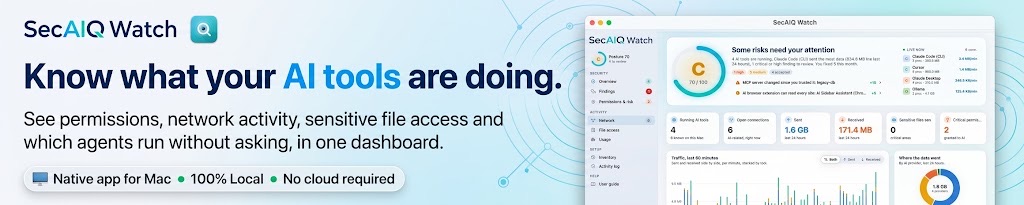
SecAIQ Watch is now a native Mac app: download it, open it and see which AI tools run on your Mac, what they can access and where they connect, all locally and read-only.

Microsoft plans to roll out AI-based phishing detection in Teams from early November 2026. It looks at conversation context to catch social engineering and impersonation, even when no malicious link or file is present.

Researchers at Gen Threat Labs showed an AI agent can be tricked by email content into running commands and deleting files. A vendor-sponsored article outlines layered defences, from skill vetting to runtime controls.

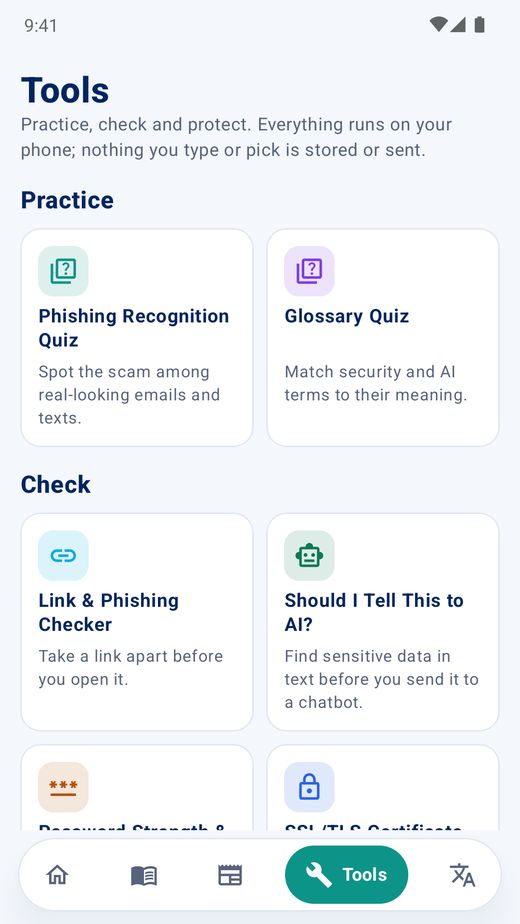
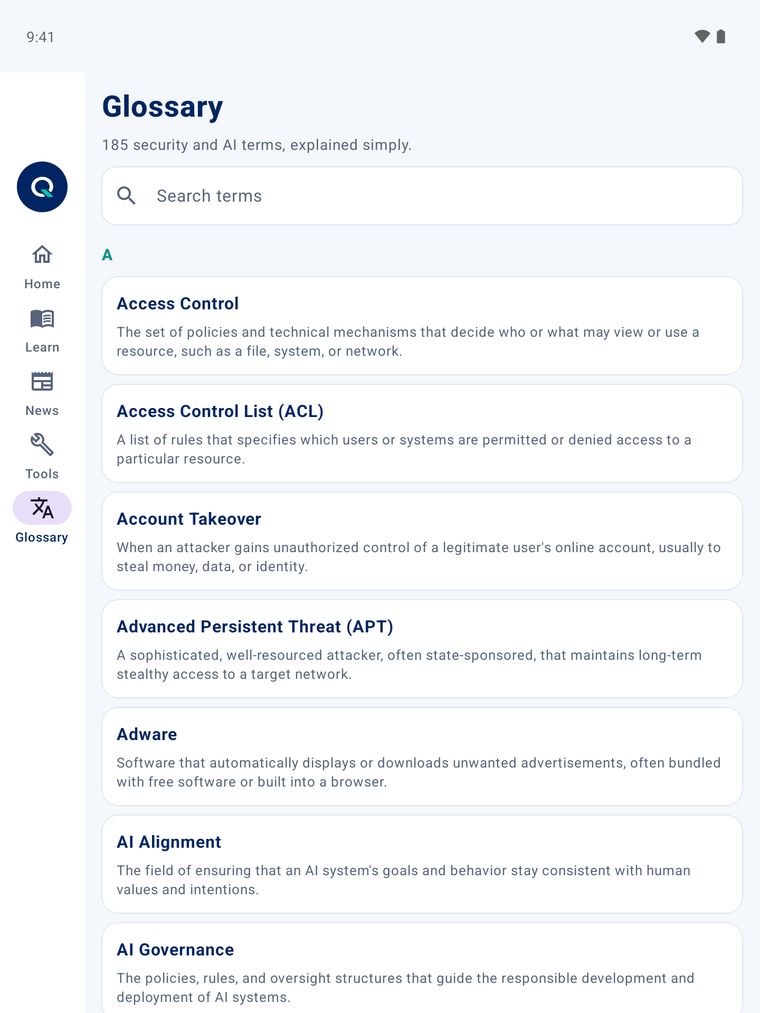
SecAIQ is now a free mobile app for iPhone, iPad, Android phones and Android tablets: plain-language security and AI safety guides, free tools, a glossary and news, with no account needed.

Organisations are being urged to act now on a critical PHP issue that could allow attackers to execute commands on web servers. All PHP versions are affected and a fix has been released.

ISO/IEC 27090:2026 gives guidance on cybersecurity threats specific to AI systems. For organizations already running ISO/IEC 27001 and 42001, the most efficient path is to extend what they have rather than build new standalone structures.

A new comparison of AI-driven and human penetration testing finds each approach has distinct strengths, suggesting the two work best together rather than as substitutes.
Security and AI safety in your pocket
Guides, free tools, a glossary and the latest news, now on your iPhone, iPad, Android phone and Android tablet. Plain language, no account needed.
- Guides
- Security tools
- Glossary
- Quizzes
- Latest news





Free security tools
No account needed, check your digital security in a few minutes.

Password Strength & Breach Check
Check how strong a password is and whether it has already leaked in a known data breach, entirely in your browser. Your password is never sent anywhere in full.

Phishing Recognition Quiz
Look at sample emails and text messages and decide which are phishing and which are safe, then see a short explanation after each answer.

Should I Tell This to AI?
It's easy to paste a whole email thread or document into a chatbot without noticing the password, ID number, or client detail buried inside it. This tool scans your text for common sensitive-data patterns before you send it anywhere, flagging what to remove or redact first. Nothing you paste here is sent anywhere, the scan runs entirely in your browser.

Link & Phishing Checker
Phishing links rely on you not looking closely, a domain that's one character off, a redirect chain that ends up somewhere else entirely, or a file extension disguised to look safe. Paste any link here and this tool breaks down its real structure: the actual destination domain, lookalike-brand detection, hidden redirects, and risky extensions, all analyzed locally without visiting the site.

Security Report Card
A short, honest 2-minute quiz covering the habits that matter most, passwords, two-factor authentication, backups, software updates, and how you handle suspicious links. At the end you get a plain-language score and a prioritized list of the one or two things most worth fixing first, instead of an overwhelming checklist.

Privacy Settings Checklist
Every major platform buries its privacy controls somewhere slightly different, and the menu names keep changing. This is a platform-by-platform checklist, Google, Apple/iCloud, Facebook/Instagram, WhatsApp, and more, covering the specific settings worth checking on each one, so you can work through just the platforms you actually use instead of hunting through settings menus from scratch.

Digital Footprint Check
Most people underestimate how much a stranger can piece together about them from public information alone. This is a guided self-assessment, not an automated scan, walking you through exactly what to go check yourself: search-engine results, old social accounts, data-broker listings, location data in photos, and what your professional profile gives away. Your progress is saved only in your own browser.

Screenshot Masker
Blur, pixelate, or block out names, phone numbers, IBANs, or anything else in a screenshot before you share it. Everything happens in your browser.
Cybersecurity & AI-safety glossary
Stuck on a term?
Phishing, ransomware, zero trust… get a plain-language explanation for hundreds of terms in seconds.
Browse the glossaryBrowse by topic
New: SecAIQ Watch for Mac
See what your AI tools are really doing
SecAIQ Watch is a local, read-only monitor that shows which AI tools run on your computer, what they connect to and what they can access, without ever reading your prompts or files. Get the native Mac app (14-day free trial), or use the free open-source edition.
Mac app: 14-day free trial, then $19.99/year · Open-source edition: macOS, Linux and Windows, MIT licence

Live demo · synthetic data →